Overview
The Basics
Players can access their Character System menu through the left sidebar button in multiplayer lobbies. Before playing a character-enabled gamemode, players should set their desired character loadout.
UltraStack’s character system becomes active only during Character gamemodes.
Non-character gamemodes such as Puzzle and Score will still grant rewards on victory, but no mechanics will be active ingame.
Loadout
Players select a character and two artifacts.
- Character: Provides an ability activated by pressing the keybind ingame, as well as passive effects.
- Artifact: Provides bonuses which boost different aspects of gameplay. Can be leveled up.
Artifact Effects
Each artifact has a level represented by star count:
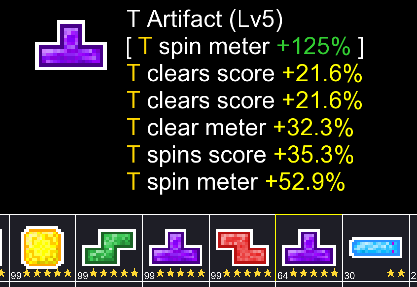
Levels affect two things:
- The unique effect of the artifact (wrapped in [] brackets)
- The quantity of artifact effects
The unique effect is based on the type of artifact and its bonus scales linearly based on artifact level. For example, the T Artifact’s unique scales by +25% per level.
Levels also correspond directly to the amount of normal effects. A 2* artifact only provides two effects:
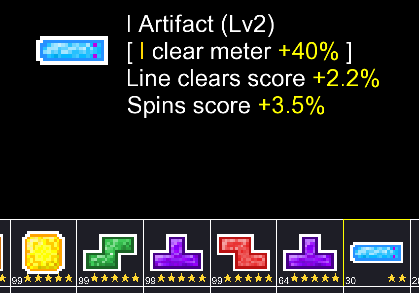
The strength and type of each non-unique effect is randomly rolled when the artifact is created. The roll is based on artifact quality which is shown in the bottom left of each artifact icon. [RNG Tables]
Character Abilities
Each character has a meter (displayed as a circle bar ingame) which fills through various means. When full, the ability can be activated through the keybind, draining the meter back to 0.
There are two ways meters fill:
- Scoring (gaining score increases meter)
- Over time (meters have a passive time-based fill)
Each character has a different multiplier for each fill type, so scoring may impact some characters more than others that rely on passive fill instead.
See [Character Stats] for all stats.