Basic Piece Movement
Basic Movement
Piece movements for games in this genre:
- Left/Right - Lateral movement, the piece stops if it is blocked
- Rotate CW or CCW - Rotate around the center of rotation, with a set of “wall kicks” which check other locations for the piece if it is blocked
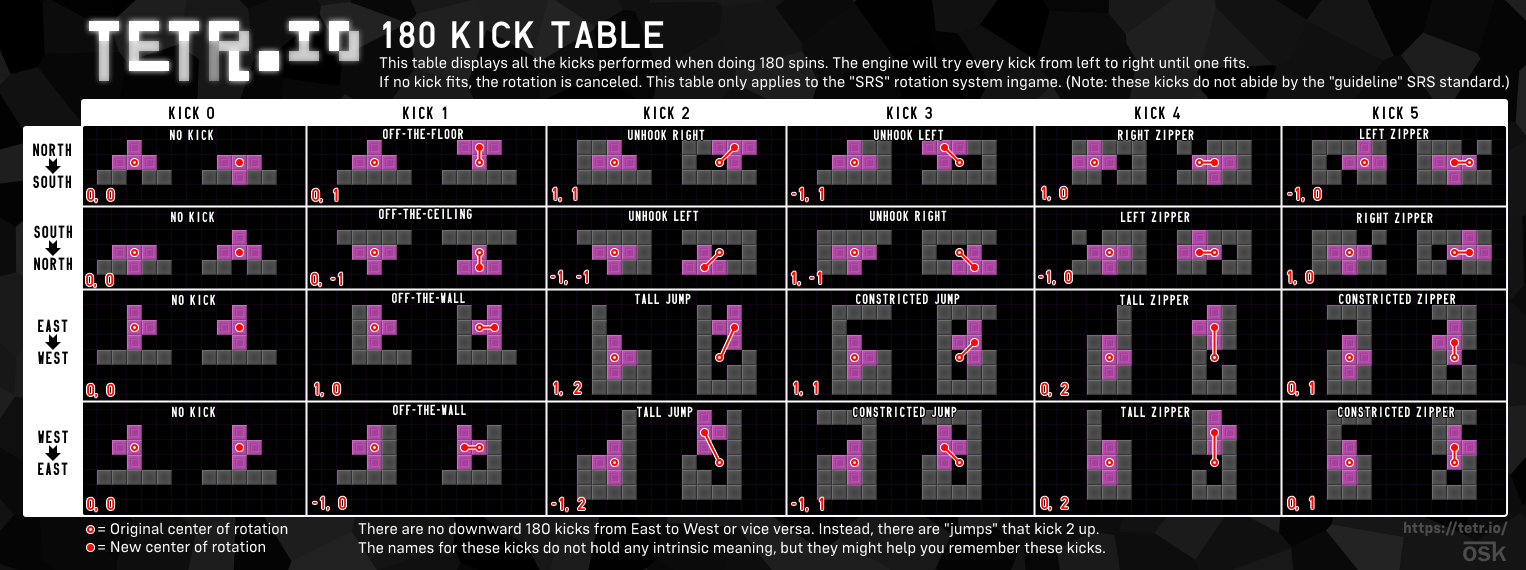
- Rotate 180 - Also a rotation, but uses different kicks (not equivalent to rotating CW or CCW twice)
- Soft Drop - Drops the piece down similarly to gravity
- Hard Drop - Instantly drops and places the piece
Rotation
Following the SRS guidelines, every piece has a center of rotation:
Pieces rotate mathematically around this point, meaning that an identical clockwise rotation from these two states will cause the piece to visually appear in a different column:
Kicks
If a rotation key is pressed, but any tile of the piece would intersect with a solid block or wall, different positions are checked. These are usually non-intrusive and contribute to the game feeling less janky - for example, the T piece rotation shown below would cancel the input and do nothing if kicks weren’t in the game:
Instead, after checking a list of preset kick positions, the T piece ends up here:
Comprehensive documentation for all tetromino kicks exists here. The 180 kicks used in UltraStack are identical to TETR.IO’s kicks, found here.
3-Mino Rotation
UltraStack adds functionality to 3mino pieces as shown below:
I3 wall kicks (identical to JLSTZ)
| 1 | 2 | 3 | 4 | 5 | |
|---|---|---|---|---|---|
| 0→R | (0, 0) | (-1, 0) | (-1, 1) | (0, -2) | (-1, -2) |
| R→0 | (0, 0) | (1, 0) | (1, -1) | (0, 2) | (1, 2) |
| R→2 | (0, 0) | (1, 0) | (1, -1) | (0, 2) | (1, 2) |
| 2→R | (0, 0) | (-1, 0) | (-1, 1) | (0, -2) | (-1, -2) |
| 2→L | (0, 0) | (1, 0) | (1, 1) | (0, -2) | (1, -2) |
| L→2 | (0, 0) | (-1, 0) | (-1, -1) | (0, 2) | (-1, 2) |
| L→0 | (0, 0) | (-1, 0) | (-1, -1) | (0, 2) | (-1, 2) |
| 0→L | (0, 0) | (1, 0) | (1, 1) | (0, -2) | (1, -2) |
L3 wall kicks
| 1 | 2 | 3 | 4 | 5 | |
|---|---|---|---|---|---|
| 0→R | (0, 0) | (-1, 0) | (0, 1) | (-1, -1) | (1, 1) |
| R→0 | (0, 0) | (1, 0) | (0, -1) | (1, 1) | (-1, -1) |
| R→2 | (0, 0) | (1, 0) | (0, -1) | (1, 1) | (-1, -1) |
| 2→R | (0, 0) | (-1, 0) | (0, 1) | (-1, -1) | (1, 1) |
| 2→L | (0, 0) | (1, 0) | (0, 1) | (1, -1) | (-1, 1) |
| L→2 | (0, 0) | (-1, 0) | (0, -1) | (-1, 1) | (1, -1) |
| L→0 | (0, 0) | (-1, 0) | (0, -1) | (-1, 1) | (1, -1) |
| 0→L | (0, 0) | (1, 0) | (0, 1) | (1, -1) | (-1, 1) |
I3 180 wall kicks
| 1 | |
|---|---|
| 0→2 | (0, 1) |
| R→L | (1, 0) |
| 2→0 | (0, -1) |
| L→R | (-1, 0) |
L3 180 wall kicks (identical to JLSTZ)
| 1 | 2 | 3 | 4 | 5 | |
|---|---|---|---|---|---|
| 0→2 | (0, 1) | (1, 1) | (-1, 1) | (1, 0) | (-1, 0) |
| R→L | (1, 0) | (1, 2) | (1, 1) | (0, 2) | (0, 1) |
| 2→0 | (0, -1) | (-1, -1) | (1, -1) | (-1, 0) | (1, 0) |
| L→R | (-1, 0) | (-1, 2) | (-1, 1) | (0, 2) | (0, 1) |
Repeating Movements
Left/Right and Soft Drop are repeating actions - when pressed, the piece performs the movement immediately and repeats at set intervals if the key is still held down. The timing for these repeats are as follows:
DAS and ARR
- Holding Left/Right will perform the action immediately.
- After DAS milliseconds, the action is performed again.
- (repeating) After ARR milliseconds, the action is performed again.
With a DAS of 100 and an ARR of 32, piece movement occurs at:
0 (instant), 100 (DAS), 132 (ARR), 164 (ARR), 196 (ARR), etc.
- DAS stands for Delayed Auto Shift.
- ARR stands for Automatic Repeat Rate.
Soft Drops
Drops the piece down by a tile at a repeating interval (usually, but not always, a factor of gravity).
In some games with adjustable soft drop speeds, an instant soft drop can be set - teleporting the piece to the ground like a hard drop without placing it. UltraStack does not have adjustable DAS, ARR, or soft drop speed.
Hard Drops
Places the piece and performs a Line Clear.